
- Knowledge Base
- General Info
- Tips & Tricks
How can I edit an order that is locked in error?
Certain records in xTuple only allow one person to edit at a time. It is possible that if you lose connection to the network while you in a record, the record can become locked.

First, Make sure no one is really editing this order. The user locked in the record will be in parenthesis. You do not want to kick someone out of an order that they are legitimately in. If you know for sure that the lock is in error you can "Kill" the process.
You must be logged in as the admin user to do this
Go to System > Utilities > Process Lock Manager
Look for the user that is in the record and is also idle. Right click on the idle lock and select "Kill Process".
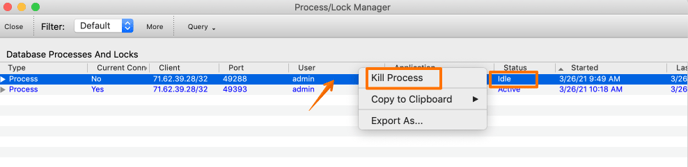
Be sure not to kill any active processes as the user could be in the middle of a transaction.